

Most Companies Overpay for M365
See where your licence spend goes — and where it could work harder.
Here's where the waste hides
15-30% of typical M365 spend goes to misaligned licences.
What you're paying for and what you're using tend to drift apart. A third-party review based on your actual data — not estimates — shows where the gaps are.
Three dimensions. One assessment.

Licence Complexity
Microsoft licensing has hundreds of line items and bundling options. We align your licences to actual business needs — not a one-size-fits-all model.

Usage Patterns
Our automated tools extract and analyse 180 days of real usage data — who uses what, how often, and what goes unused.

Roles and Requirements
We map licences to job functions and security needs — informed by experience across many customer engagements and a structured licensing discussion.
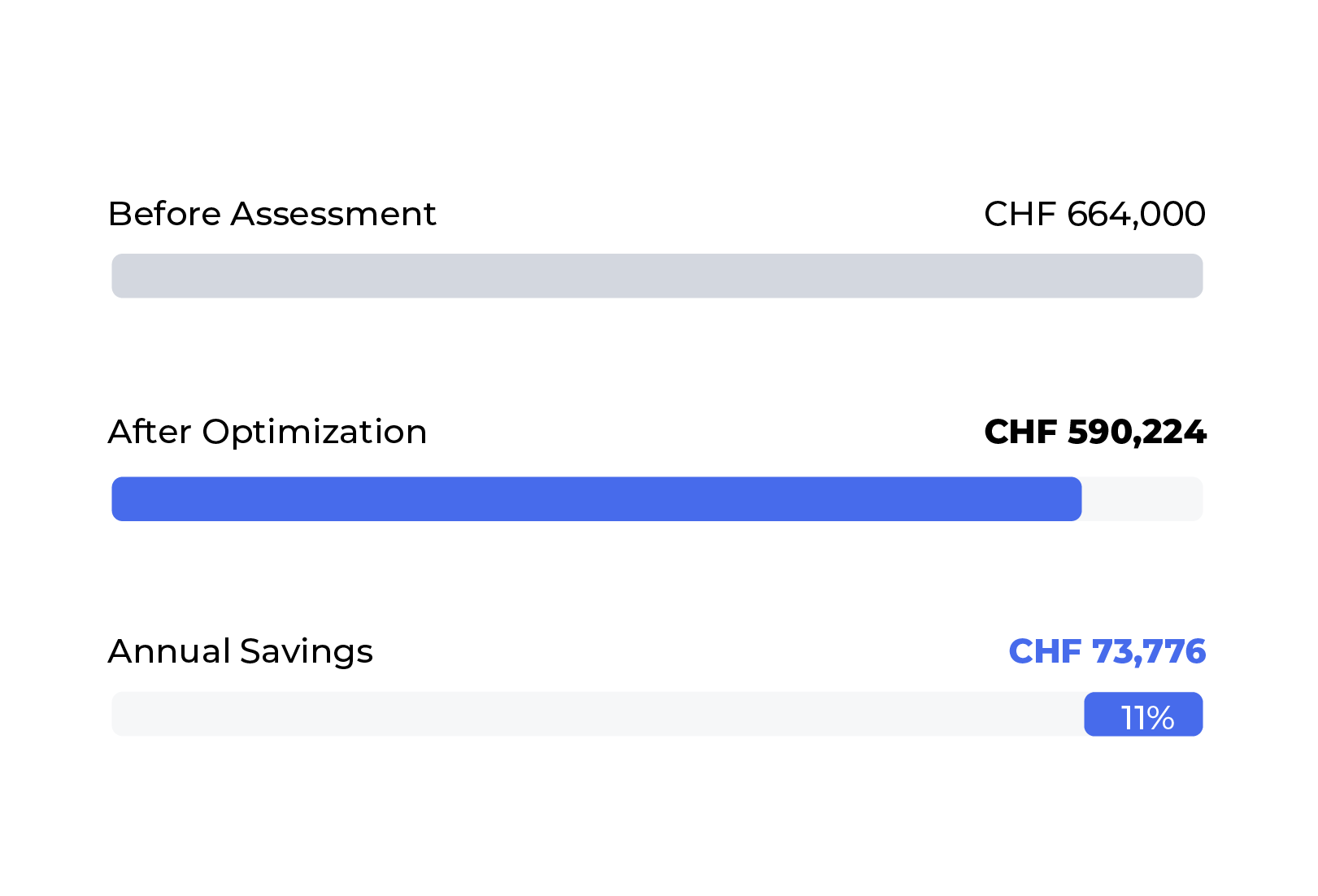
Real result: Waste redirected to productivity
Gudel AG — 1,406 users assessed. CHF 73,776 per year identified for reallocation.
Security maintained for every user. 78 licences removable immediately. One assessment. One conversation. Spend redirected where it matters.


Security & Process — Your Questions Answered
Every assessment begins with trust. Here's how we protect your data, what we access, and how the process works — straight answers for the questions your IT team will ask.
For the full technical details, download our Data Security & Privacy Policy (PDF).
We access only metadata and usage statistics through 8 read-only Microsoft Graph API permissions: user profiles, group memberships, directory structure, organization details, usage reports, audit logs, mailbox settings, and Teams call records. We cannot access email content, file contents, OneDrive documents, SharePoint data, or chat messages. We cannot modify, delete, or send any data in your environment.
Each permission maps to a specific part of the analysis. For example, Reports.Read.All tells us which licenses are actually being used, Group.Read.All helps us segment users by role and department, and AuditLog.Read.All lets us analyze 180 days of activity patterns. Without any one of these, the assessment would have blind spots. All 8 are read-only — Microsoft's consent screen confirms this before you approve.
No. We collect names, email addresses, and department information — strictly for mapping licenses to users and segmenting by role. No telephone numbers, private addresses, or other personal contact details are collected. For Teams PSTN call records, Microsoft masks the actual phone numbers — we only see user identity and call duration.
Data is processed on a dedicated, certificate-secured NUDGEIT machine — only machines with a specific security certificate can run the analysis application. All data is encrypted in transit (TLS 1.2+) and at rest (AES-256 via BitLocker). The entire process operates within the Microsoft ecosystem; no third-party services are involved in data collection or processing.
Yes. Every data access is logged as a service principal sign-in in your Entra ID sign-in logs. Your IT team can see exactly when our application queried your tenant and can configure automated alerts for this activity. You have full visibility at all times.
You have two options, both effective immediately: (1) Delete the Enterprise Application from your Entra ID tenant entirely (Entra Portal → Enterprise Applications → locate and delete), or (2) disable sign-in for the service principal to block access while keeping the registration. Either way, we cannot access your data once revoked. We provide step-by-step instructions as part of the assessment documentation.
No. The data collection is a read-only, one-time extraction from Microsoft's Graph API. No agents are installed, no configurations are changed, and no user-facing services are affected. Your users will not notice a thing.
For a one-time assessment, all tenant data is deleted within 14 days of delivering the report. If you engage NUDGEIT for follow-up license optimization, data is retained only during the active engagement (for rollback safety) and deleted upon completion. You can request immediate deletion at any point by contacting info@nudgeit.com.
Microsoft CSP Partner
Swiss-based
Read-only access
No obligation
Your data is accessed via read-only connection only. No changes are made to your Microsoft 365 environment. All connections encrypted with TLS 1.2+. Access permissions automatically terminated upon completion. NUDGEIT AG is registered in Switzerland and complies with GDPR/DSGVO requirements.